
2DO
A filing cabinet you can see.
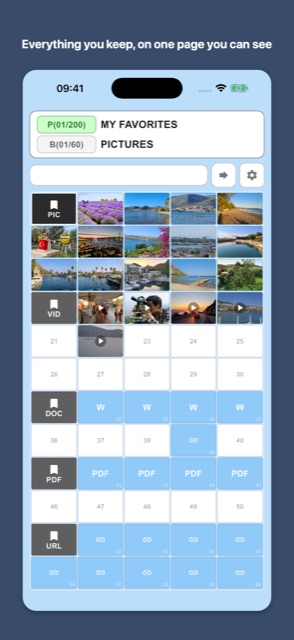
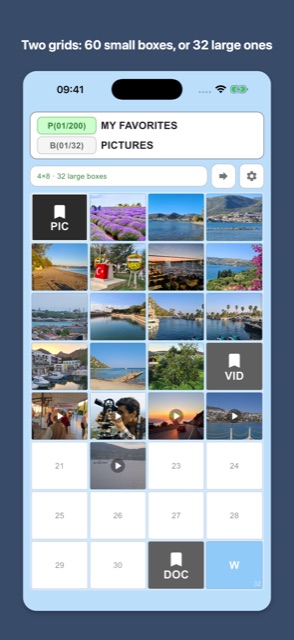
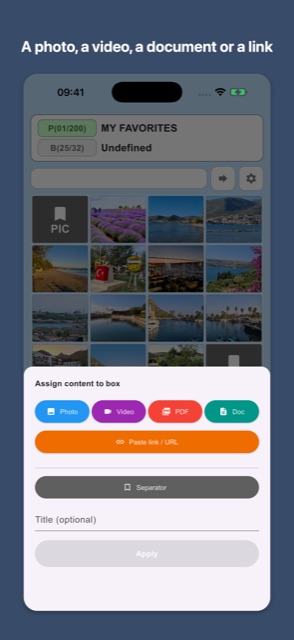
Swipe the screenshots sideways to see more.
2DO gives you a grid of boxes. You put a photo, a video, a document or a link in a box, and from then on you know where it is — not because you remember a folder name, but because you remember where on the page you put it.
Two hundred pages. Sixty boxes on each. Twelve thousand places to put something.
Share → 2DO
This is what the app is really for. A reel you want to keep, a recipe, a video someone sent you: tap Share, choose 2DO, and it goes into the first free box on the page you are on. No typing, no folder to choose.
Open a page, name it MY FAVORITE BLUES, and everything you share from then on lands there, in order. Nothing is stuck where it landed — a box can be moved to any other box, on that page or any other.
Two dimensions
Pages are the first dimension: one page per subject, named however you like. Inside a page, separator boxes are the second. They cut the page into bands, so VIDEOS, DOCUMENTS and LINKS each sit in a part of it you can point at.
Page number, then place on the page. That is an address you can hold in your head instead of a path six folders deep — and it is what the 2 in 2DO stands for.
Two grids
5 × 12 gives you sixty boxes on a page, everything at once. 4 × 8 gives you thirty-two bigger boxes, easier to hit and easier to read. Switch whenever you like: the numbers and the contents stay where they are.
Your data stays yours
Nothing is uploaded. There is no account and no server. Export writes everything to one file you keep; import brings it back on a new device.
Also
- Eight colour themes
- Ten languages
- Works offline, always
- No ads
Free and paid
The first two pages are free and stay free — a hundred and twenty boxes, enough to see whether this is how your mind works. One payment opens all two hundred pages. No subscription.